



Application Security
AI-Generated Code Is Changing the Security Equation. Can Your Code Review Keep Up?
Published: 26 November 2026 • Updated: 26 November 2026 • 7 min read
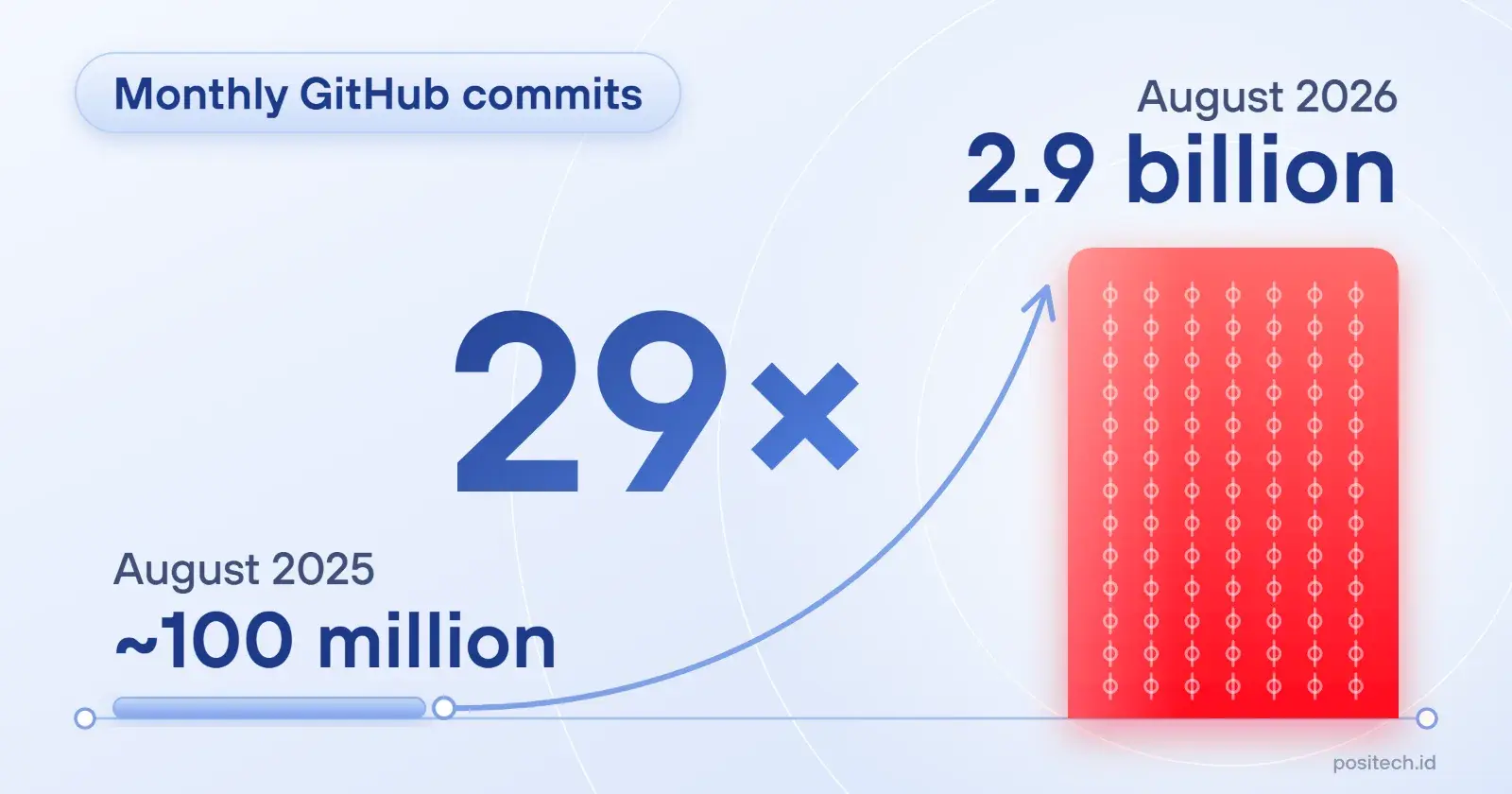
Table of contents
Quick answer. AI lets developers produce code far faster than before, but security review has not scaled with it: in Veracode’s 2025 study 45% of AI-generated code samples failed security tests, and in Sonar’s survey only 48% of developers said they always check AI-generated code before committing. To keep up, build SAST, SCA, secret detection and DAST into the development workflow instead of relying on a manual review at the end.
AI coding assistants are changing how software gets built worldwide, and Indonesia is no exception. Developers can generate code in a fraction of the time it used to take. That means faster development — but also more code to review and secure. Is your company keeping up in pace with these changes?
Picture a factory that triples its line speed and keeps one quality inspector at the end of the line. Output goes up. Inspection stays where it was. Some items pass him without any checks.
That’s what happening in software industry today. AI has given developers a productivity superpower, allowing them to produce code faster than ever. GitHub reported that it was handling 2.9 billion commits per month as of August 2026 – versus nearly 100 million commits in August 2025, which was a record month for that metric. A 29x increase in just a year!
The problem is, working code from AI does not always mean safe code.
Why it is a live problem
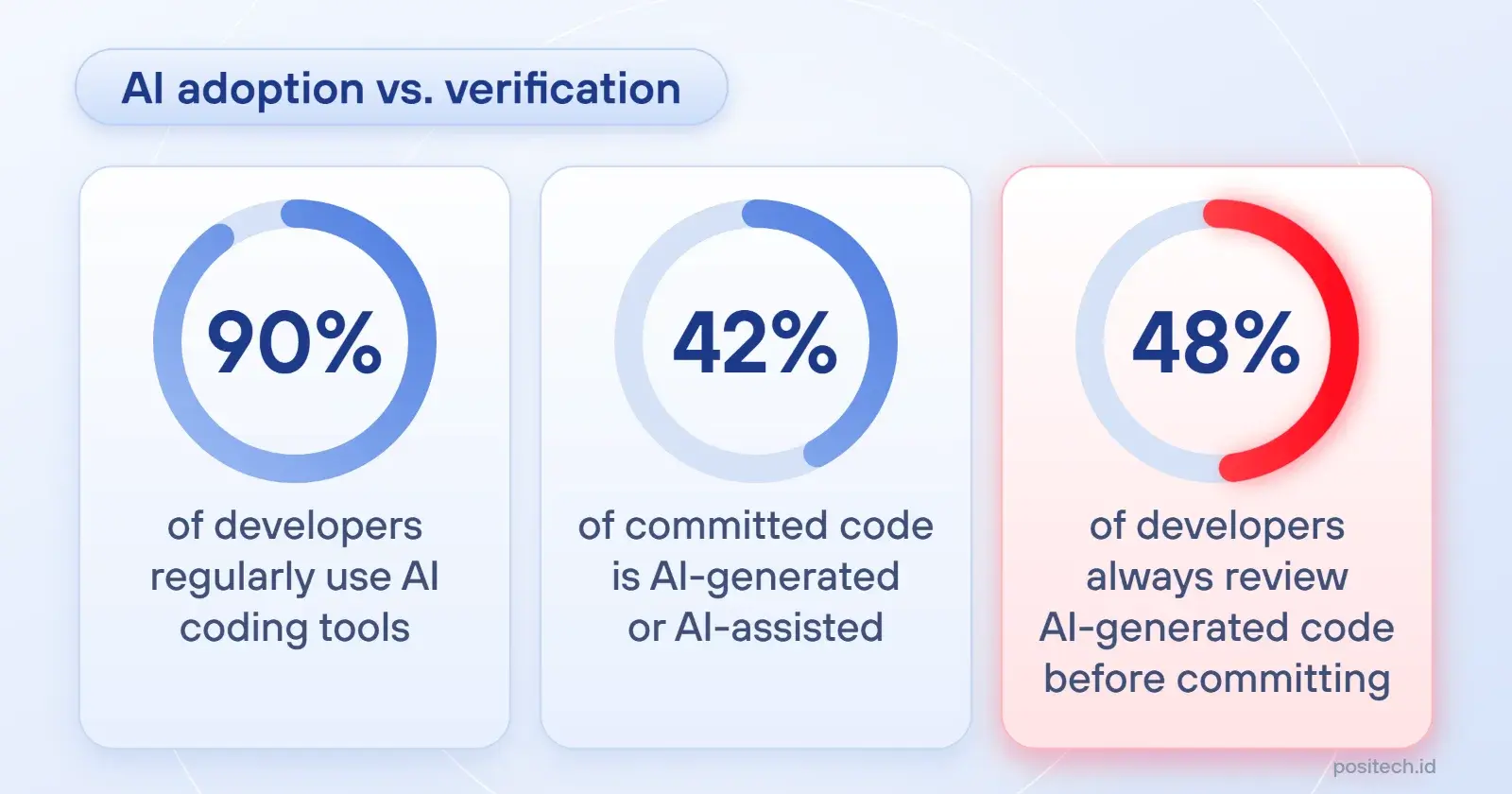
In January 2026, 90% of developers regularly used at least one AI tool for coding and development, according to JetBrains research. Indonesia is part of this shift, too. A Dicoding survey of Indonesian digital professionals published as the Indonesia Developer Outlook 2026, found that 86% of them use AI regularly.
With AI, developers don’t need to write the code in programming language. Yet Veracode’s 2025 study found that 45% of AI-generated code samples failed security tests and introduced detectable OWASP Top 10 vulnerabilities.
You might expect developers to manually review the code they ask AI to generate, but many skip this step. In a January 2026 Sonar survey of more than 1,100 developers, respondents reported 42% of the code they commit is AI-generated or assisted, but only 48% said they always check it before committing.
Code production is accelerating, but security reviews aren’t necessarily keeping pace. For CISOs and application security teams, the question is no longer whether developers should use AI. It’s whether existing security processes can keep up with the growing volume of code it produces.
What Changed for Application Security with AI
Not all AI-generated code is insecure. But it introduces a challenge: developers can receive code that looks correct and works as expected without knowing exactly how it was constructed or which security assumptions it makes.
AI-generated code may look very clean, it is nearly always syntactically valid, and studies show developers complete well-specified tasks substantially faster with AI assistance. But models learn from existing code, which can include outdated approaches and insecure patterns.
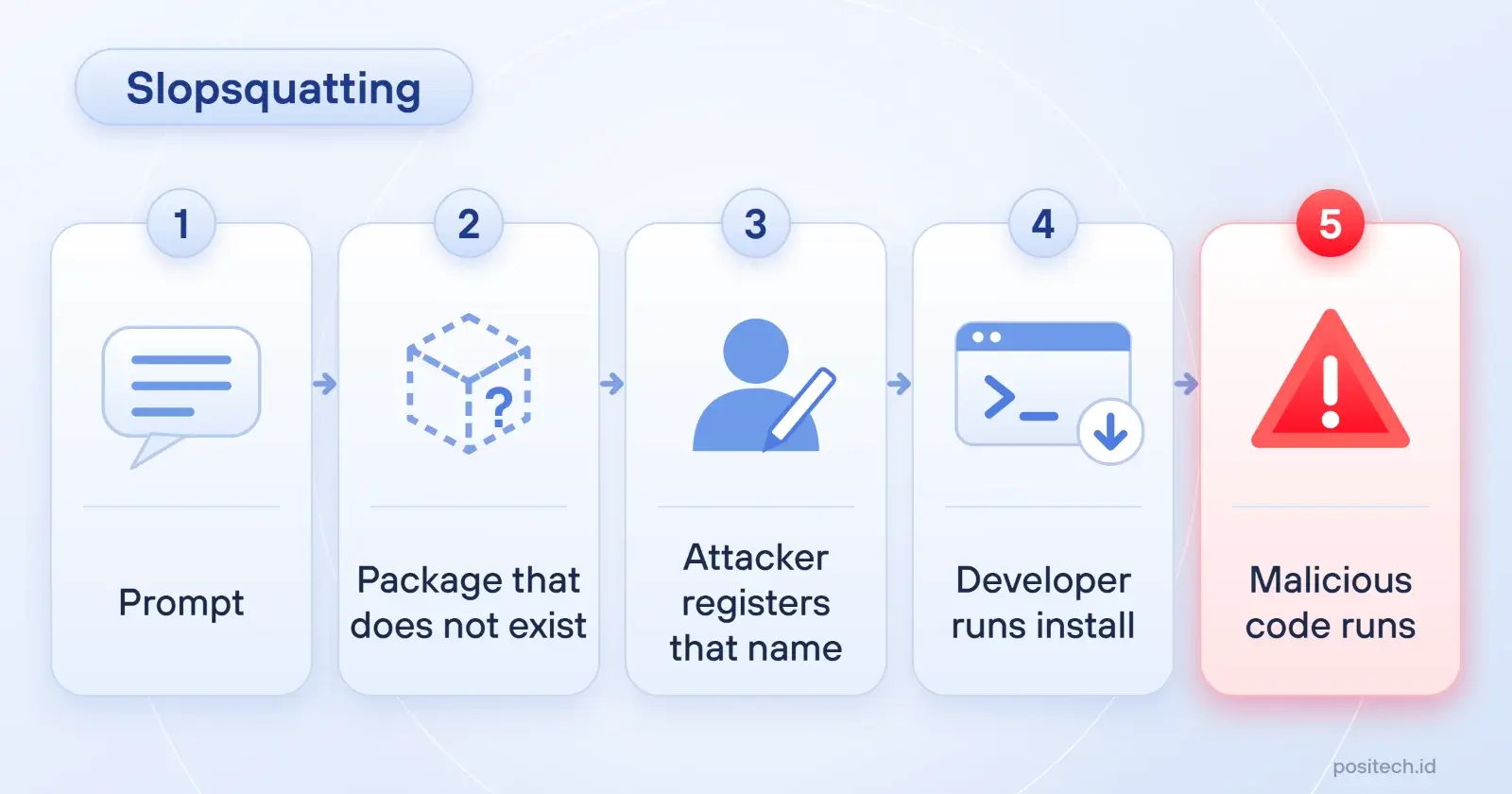
AI tools can also invent package names that do not exist. A 2025 USENIX Security study found that package hallucinations occurred in at least 5.2% of samples from commercial LLM models and 21.7% from open-source models in its experiments. Attackers can exploit this by publishing malicious packages under names developers might mistakenly install — a technique known as slopsquatting.
The result is a development workflow in which more code can enter a project, while the time available to examine each line does not necessarily increase.
Software development before AI vs. with AI: cybersecurity perspective
AI changes how much code is produced and where it comes from. It doesn’t change the need to understand what that code does, nor does it make security checks any less necessary.
AI Coding and Data Security: How Secrets Leak into Code
AI coding tools introduce another route for sensitive information to enter or leave a codebase. Developers may unintentionally expose credentials while using assistants or accepting generated code. This is not a theoretical concern. GitGuardian reported 28.65 million new hardcoded secrets in public GitHub commits during 2025, up 34% year on year.
Secrets can leak in several ways:
Secrets can leak in several ways:
- Prompts: Developers paste API keys, access tokens, connection strings, or internal configuration into an AI assistant when asking for help.
- Generated configuration and code: An assistant produces code or configuration files containing hardcoded credentials, sometimes copied from the prompt or surrounding context.
- Test and debug files: Temporary scripts, logs, .ENV files, and example configurations containing real credentials make their way into commits.
- Dependencies and integrations: Generated code may suggest packages, services, or integration patterns that require credentials, which developers then store insecurely.
- AI agents, MCP integrations, and CI/CD: Agents or automation use over-privileged credentials, expose secrets in logs, or are manipulated through prompt injection.
- Prompt, session, and telemetry logs: Secrets present in prompts, tool calls, or responses are retained, shared, or exposed through logging systems.
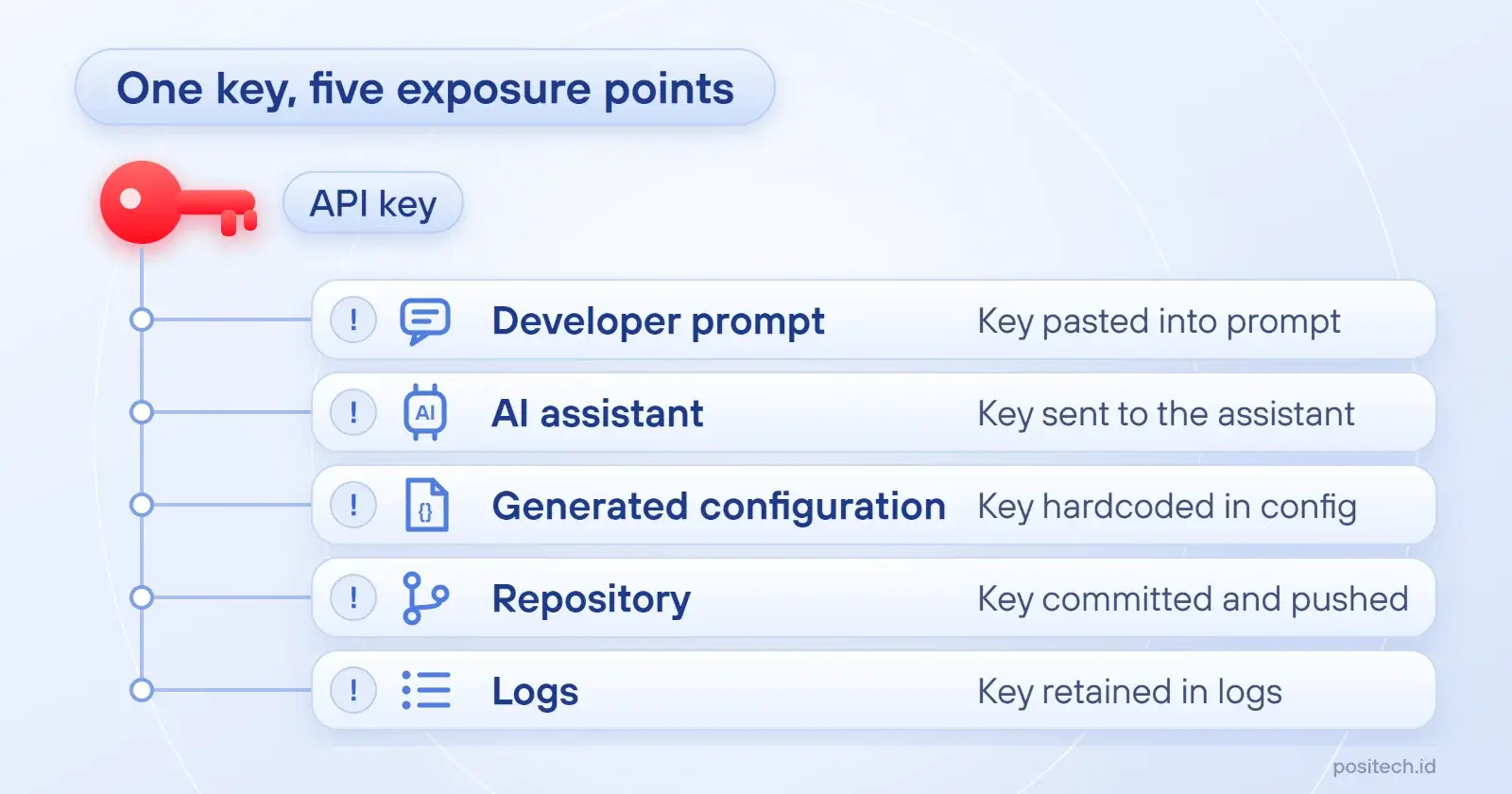
One important detail: deleting a secret from code does not make it safe again. If an API key or password has been committed, pushed, or exposed, assume it may have been copied. The right response is to revoke or rotate the exposed secret first, investigate where it may have been used, and then remove it from the code and repository history.
How to Scale Application Security for AI-Generated Code
To handle the increasing volume of generated code, security review should scale. That means building automated checks into the development workflow, rather than relying on a manual review at the end.
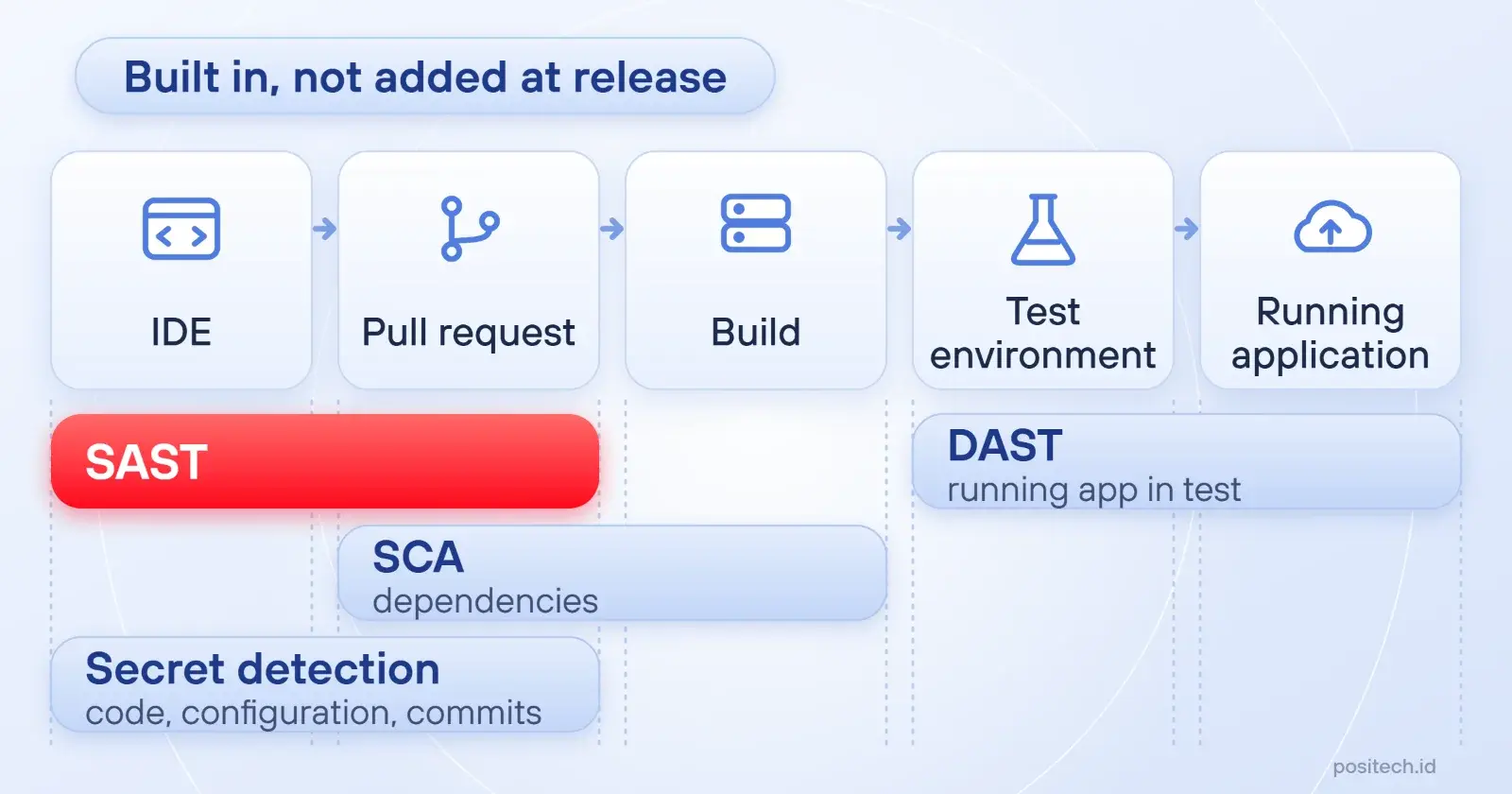
Automated security checks cover different parts of the development process:
These methods help teams check more code without adding the same amount of manual work. For example, automated AppSec tools such as Positive Technologies’ Application Inspector can help identify vulnerabilities in source code as part of the development process.
Automated security checks cover different parts of the development process:
- SAST (Static Application Security Testing) checks source code for potential vulnerabilities without running the application. It can be integrated into IDEs and pull requests to give developers feedback early.
- SCA (Software Composition Analysis) identifies known vulnerabilities and other risks in third-party and open-source dependencies.
- Secret detection looks for exposed credentials in code, configuration files, and commits.
- DAST (Dynamic Application Security Testing) tests a running application to identify vulnerabilities that can be observed from the outside.
These methods help teams check more code without adding the same amount of manual work. For example, automated AppSec tools such as Positive Technologies’ Application Inspector can help identify vulnerabilities in source code as part of the development process.
Key takeaways
- AI has made code production much faster: GitHub handled about 2.9 billion commits in August 2026, versus nearly 100 million a year earlier.
- Working code is not always safe code: 45% of AI-generated samples failed security tests in Veracode’s 2025 study, and only 48% of developers always check AI-generated code before committing.
- AI adds its own risks: code nobody fully understands, hallucinated package names (slopsquatting), and secrets leaking through prompts, generated code and logs.
- Deleting an exposed secret does not make it safe: revoke or rotate it first, investigate where it was used, then clean the code and repository history.
- Scale review by building SAST, SCA, secret detection and DAST into the development workflow, instead of relying on a manual review at the end.
FAQs
Is AI-generated code less secure than code written by developers?
Not necessarily in every case. AI can produce secure code, but it can also reproduce insecure patterns or miss important security requirements. Research has found vulnerabilities in generated samples, which is why AI-generated code needs the same security checks as any other code.
What are the main GitHub Copilot security risks?
The risks include insecure code suggestions, outdated or vulnerable dependencies, hardcoded secrets, and developers accepting code they do not fully understand. These are not unique to Copilot; they apply to AI coding assistants more broadly.
Is it safe to paste source code or API keys into an AI assistant?
Only if your organization’s policies and the tool’s data-handling terms allow it. Avoid sharing credentials, personal data, customer information, or confidential source code with tools that have not been approved for that purpose.
Should companies block AI coding tools?
A more effective approach is to set clear rules for their use, choose approved tools, protect sensitive data, and integrate security checks into the development pipeline.
How can teams make AI-assisted development more secure?
Use SAST, SCA, and secret detection as part of everyday development. Review generated code before merging, check dependencies, test running applications, and use manual security reviews or penetration testing for complex risks. Make security validation a routine part of the workflow.
See how Application Inspector finds vulnerabilities in your code
If your team wants to understand where vulnerabilities may be entering its applications, request a free application security assessment from Positive Technologies.
Request a demo →
Cookies help us improve the user experience on our site. By continuing to use the site, you consent to the use of cookies and the processing of your data. More details can be found via the link

We think like attackers. We act before them.
Results-driven cybersecurity, delivered in Indonesia by PT Sinergi Wahana Gemilang.